
ID Document Recognition Explained: How OCR, MRZ, and Barcode Data Combine for Accurate eKYC
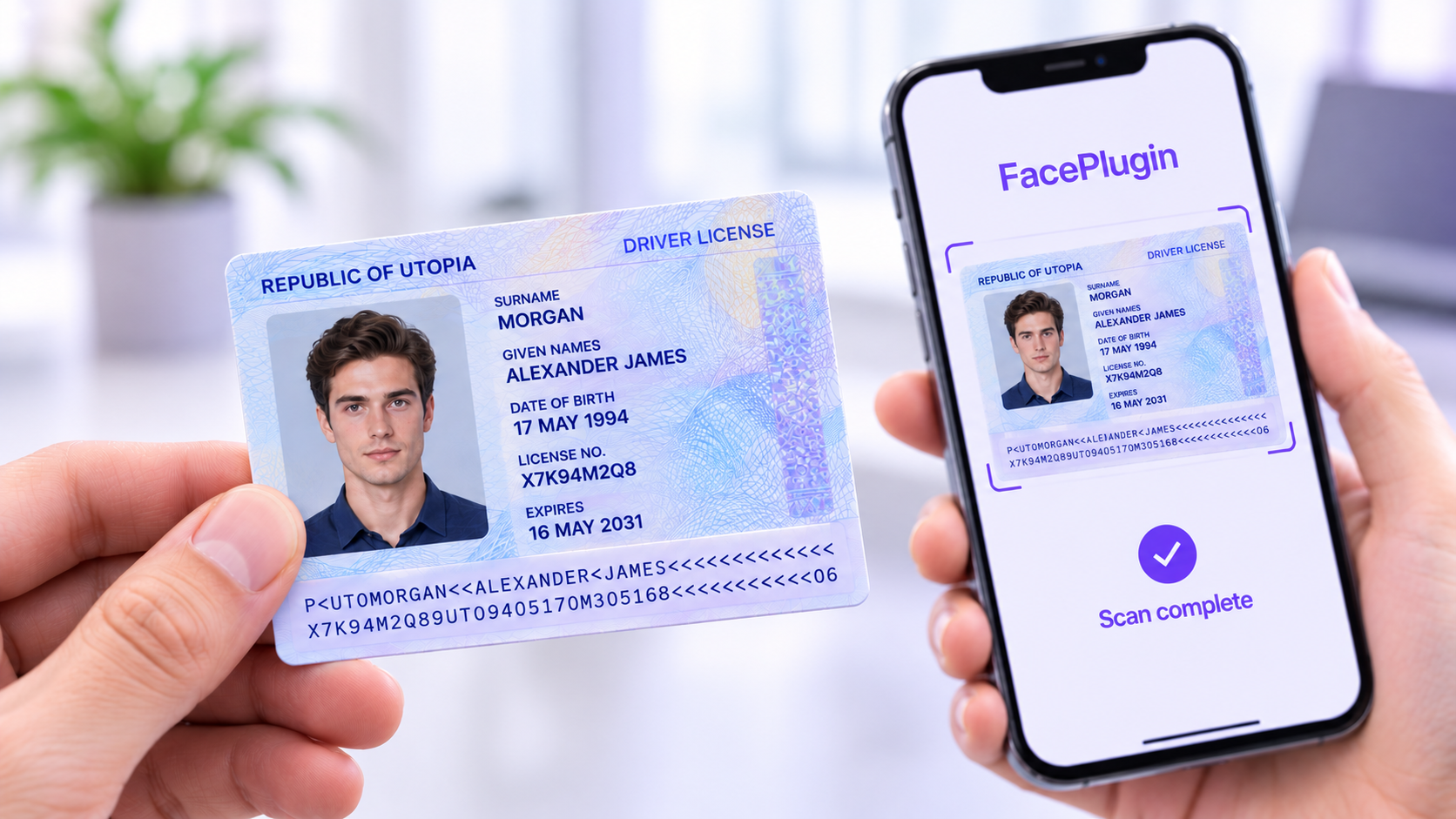
Accurate onboarding starts with reading a customer’s identity document correctly. A photo of an ID isn’t the same as usable data – name, date of birth, document number, and expiry date all have to be pulled out, cross-checked, and handed off clean before any downstream verification step can trust them. That process is ID document recognition.
FacePlugin’s ID Document Recognition SDK locates the document in frame, classifies its type, and extracts every field through a combination of OCR, MRZ parsing, and barcode decoding – then cross-checks those sources against each other before any of it is trusted. It runs entirely on infrastructure you control, so regulated businesses can digitize KYC without routing customer documents through an external cloud.
What Is ID Document Recognition?
ID document recognition is the process of reading the data on a government-issued identity document – a passport, national ID card, or driver’s license – and converting it into structured, usable fields. Instead of a human squinting at a photo of a card, software locates the document, identifies which of thousands of templates it matches, and extracts the printed and encoded data automatically.
Done well, this isn’t just a single OCR pass. FacePlugin’s implementation reconciles three independent sources of truth on the same document – the printed visual zone, the Machine Readable Zone (MRZ), and any PDF417 or QR barcode – so a mismatch between them is a signal, not something that slips through.
Why Reading the Document Correctly Matters
Every downstream step of identity verification depends on the data extracted at this stage. If a date of birth or document number is misread, an age check or a database lookup fails even when the customer and document are entirely genuine. Manual review queues fill up with cases that more reliable document recognition would never have flagged.
On-premises processing adds a second layer of importance: sensitive identity documents never leave infrastructure the business controls, which removes an entire category of data-residency and third-party-exposure risk from the onboarding flow.
Key Benefits
- Extracts structured data instead of just a photo of the card
- Cross-checks OCR, MRZ, and barcode data against each other to catch tampering and transcription errors
- Supports thousands of global passport, ID-card, and driver-license formats
- Cuts manual review volume and speeds up onboarding
- Runs fully on-premises, with no customer document ever leaving your infrastructure
- Feeds a dependable foundation into face matching and liveness checks
How ID Document Recognition Works
OCR Extraction of the Visual Zone
The process reads the printed fields on the front of the document – name, date of birth, document number, expiry date, address where applicable – using OCR tuned to the layouts of government-issued IDs rather than general-purpose document scanning.
MRZ Parsing to ICAO 9303
For passports and many national IDs, FacePlugin’s SDK reads the Machine Readable Zone and parses it to the ICAO 9303 standard, validating its checksum to confirm the data hasn’t been altered or corrupted.
PDF417 and QR Barcode Decoding
Driver’s licenses and many ID cards encode a second independent copy of the holder’s data in a PDF417 or QR barcode. The SDK decodes it and treats it as a third source to reconcile against the visual zone and the MRZ.
Field Reconciliation
Rather than trusting any single source, the SDK compares the OCR, MRZ, and barcode results field by field. Where all three agree, confidence is high; where they diverge, that mismatch is exactly the kind of signal that points to tampering or a transcription error worth a closer look.
Global Document Template Coverage
FacePlugin recognizes and classifies thousands of passport, ID-card, and driver-license formats from different issuing countries, so onboarding isn’t limited to a handful of document types.
What’s Included in FacePlugin’s ID Document Recognition SDK
- MRZ parsing – read and checksum the machine-readable zone to ICAO 9303
- Barcode decoding – PDF417 and QR data on IDs and driver’s licenses
- OCR extraction – printed fields pulled into clean, structured JSON
- Global templates – classification and reading across thousands of document formats
- On-premises deployment – server SDK on Linux via Docker, or on-device for mobile
Where ID Document Recognition Gets Used
- Banking & Financial Services – digital account opening, loan applications, and KYC onboarding
- Government – national ID verification, passport validation, and digital public services
- Healthcare – confirming patient identity before granting access to records or telemedicine
- Retail & E-Commerce – verifying buyers and sellers to reduce fake accounts and payment fraud
- Customer Onboarding & eKYC – the first step of any remote identity-verification flow
Document Recognition Alone Isn’t the Whole Picture
Extracting clean data is only the first step. On its own, document recognition can read a document perfectly without knowing whether that document is a genuine physical original or a screen replay, printout, or edited copy – that’s a separate check handled by ID document liveness detection. Combined with face matching and selfie liveness, the two checks form the complete eKYC pipeline packaged in FacePlugin’s ID Verification SDK Suite: capture the document, confirm it’s real, extract its data, and match it to a live selfie – all in one on-premises workflow.
Privacy and On-Premises Deployment
Because FacePlugin’s SDK runs on your own servers or devices, identity documents and the data extracted from them never leave infrastructure you control. That makes it straightforward to support compliance programs built around GDPR, CCPA, HIPAA, and similar data-residency requirements, without adding a third-party processor into the chain of custody for sensitive documents.
Built for Developers
FacePlugin’s ID Document Recognition SDK ships as a native package for Linux (Docker), Android, iOS, Flutter, React Native, and Windows, with a license key, a small set of methods, and structured JSON back as the result – built to drop into an existing onboarding flow without months of integration work.
Conclusion
Reliable identity verification starts with reading the document correctly. FacePlugin’s approach to ID document recognition combines OCR, MRZ parsing, and barcode decoding into a single reconciled result, running entirely on-premises, so onboarding teams get clean, validated data instead of a photo of a card – and a dependable foundation for the document liveness and face-matching steps that complete the verification.
Advanced Biometric Solutions at FacePlugin
Transform the way you secure and verify identities with FacePlugin’s on-premises face recognition, face liveness detection, deepfake detection, and ID document recognition SDKs – engineered to keep identity verification secure, private, and fully under your control.
Talk to Our TeamFrequently Asked Questions
What is ID document recognition?
ID document recognition is software that locates a passport, national ID card, or driver's license in an image, identifies its type, and extracts the printed and encoded data into structured fields such as name, date of birth, document number, and expiry date.
How is ID document recognition different from ID document liveness detection?
Recognition reads what the document says. Liveness detection checks whether the document is a genuine physical original rather than a screen replay, printout, or edited copy. A complete eKYC flow uses both.
Why combine OCR, MRZ, and barcode data instead of using OCR alone?
Each source is an independent copy of the same data. When OCR, the MRZ, and the barcode agree, confidence is high. When they disagree, the mismatch flags a possible transcription error or tampering that a single OCR pass would miss.
Does ID document recognition need to run in the cloud?
No. FacePlugin's ID Document Recognition SDK runs on your own servers (Linux via Docker) or on the user's device, so customer documents never have to leave infrastructure you control.
Deploy identity verification AI on your own terms
Talk to our team about on-premises face recognition, liveness, deepfake, and ID document verification — or dive into the documentation.